🏛️ User Hierarchy
📌 Overview
To ensure your data remains secure, the Wound³ application is configured with four different user types with different permissions. This document details these users types, their purposes, and their permissions within the Wound³ ecosystem.
🎥 Watch the Video Overview
🧑💻 User Roles
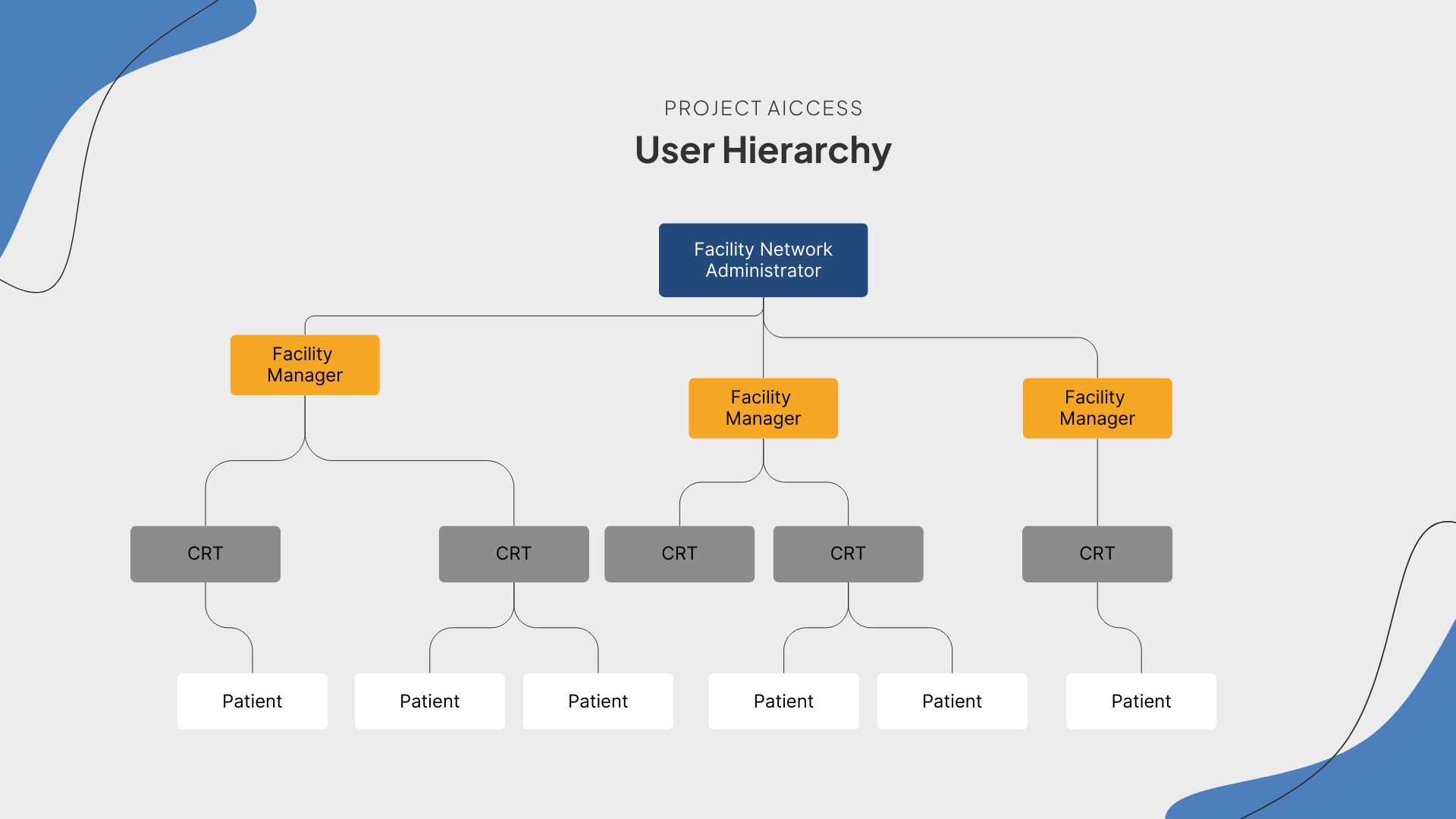
There are four different user types, each with their own set of permissions:
- 🧑🔬 Facility Network Administrators
- 👨💼 Facility Managers
- 🧑⚕️ Care Provider Users
- 😷 Patient Users
ℹ️ Note: All permissions are nested such that users at the top of the hierarchy have all of the permissions of user types below them in the hierarchy, in addition to some unique permissions.
🧑🔬 Facility Network Administrator
Facility Network Administrators, or Super Admins, are system-wide administrators responsible for overseeing multiple hospitals or clinics.
The Facility Network Administrator is the highest level user within the user hierarchy and has the broadest scope of control. They manage access and information permissions across multiple facilities via the web portal and delegate day-to-day operations by assigning Facility Managers to oversee individual facilities.
Facility Network Administrators also have full access to the system-wide database, allowing them to review patient and research data across all study locations.
👨💼 Facility Manager
Facility Managers operate at a more localized level, responsible for overseeing operations at a specific facility, such as a hospital or research center. Their primary responsibilities include:
- ➕ Creating and managing Provider and patient users at their site;
- ✅ Ensuring data integrity at the site level; and,
- ✏️ Correcting errors in the recorded information.
Unlike Facility Network Administrators, Facility Managers do not have access to system-wide data. They can only view and manage information related to their designated site.
🧑⚕️ Care Provider Users
Provider users are healthcare professionals or clinical researchers that interact with patients, collect data, and manage day-to-day patient care. Provider users have access to both the mobile and web applications, allowing them to capture/upload data and invite new patient users. Additionally, Provider users can access enhanced mobile features not available to patient users such as:
- 📝 Select, clinician-focused questionnaires;
- 😷 Patient management screens; and,
- 🎥 Video capture tools.
Care provider users are typically the most active users of the application. We are happy to provide additional training for your facility's team. Additional Provider training/support (for inquiries outside the scope of the Support Center) may be requested by contacting: support@wound3.com.
😷 Patient Users
Patient users interact with the system in a self-service manner, using the mobile application to collect and submit their own wound data for monitoring. Patients are generally onboarded during a visit at your clinical site, but can also be recommended to download the application and onboarded virtually.
🌱 Simplified UI: Patient users get access to a simplified user experience that enables them to capture quality-validated scans, complete questionnaires, and securely send their data to the Wound³ ecosystem.
Patient users can also review their own data within the mobile and web application. Unlike other users, however, patients are prevented from viewing any other user's data.